
Migrating an insurance agency to GoHighLevel in Los Angeles is a seven-step process — export and audit your book, map an insurance-shaped data model, rebuild your pipelines by line of business, move contacts with their tags and renewal history intact, wire your AMS or rater to sync both ways, re-establish TCPA consent and A2P 10DLC before you text anyone, then parallel-run and cut over. Done in that order, a full book migration takes about one to three weeks and you lose nothing — not a renewal date, not a note, not a consent record. Done in the wrong order, it’s how agencies drop half their custom fields, re-key 9,000 contacts by hand, and accidentally text a list they no longer have consent to text.
This is the operator playbook for doing it cleanly: what “migrating to GoHighLevel” actually means for an LA agency running EZLynx, HawkSoft, Applied, or a pile of spreadsheets, the real cost of leaving your data scattered, the exact seven steps, a realistic timeline, and the mistakes that quietly lose data on the way in.
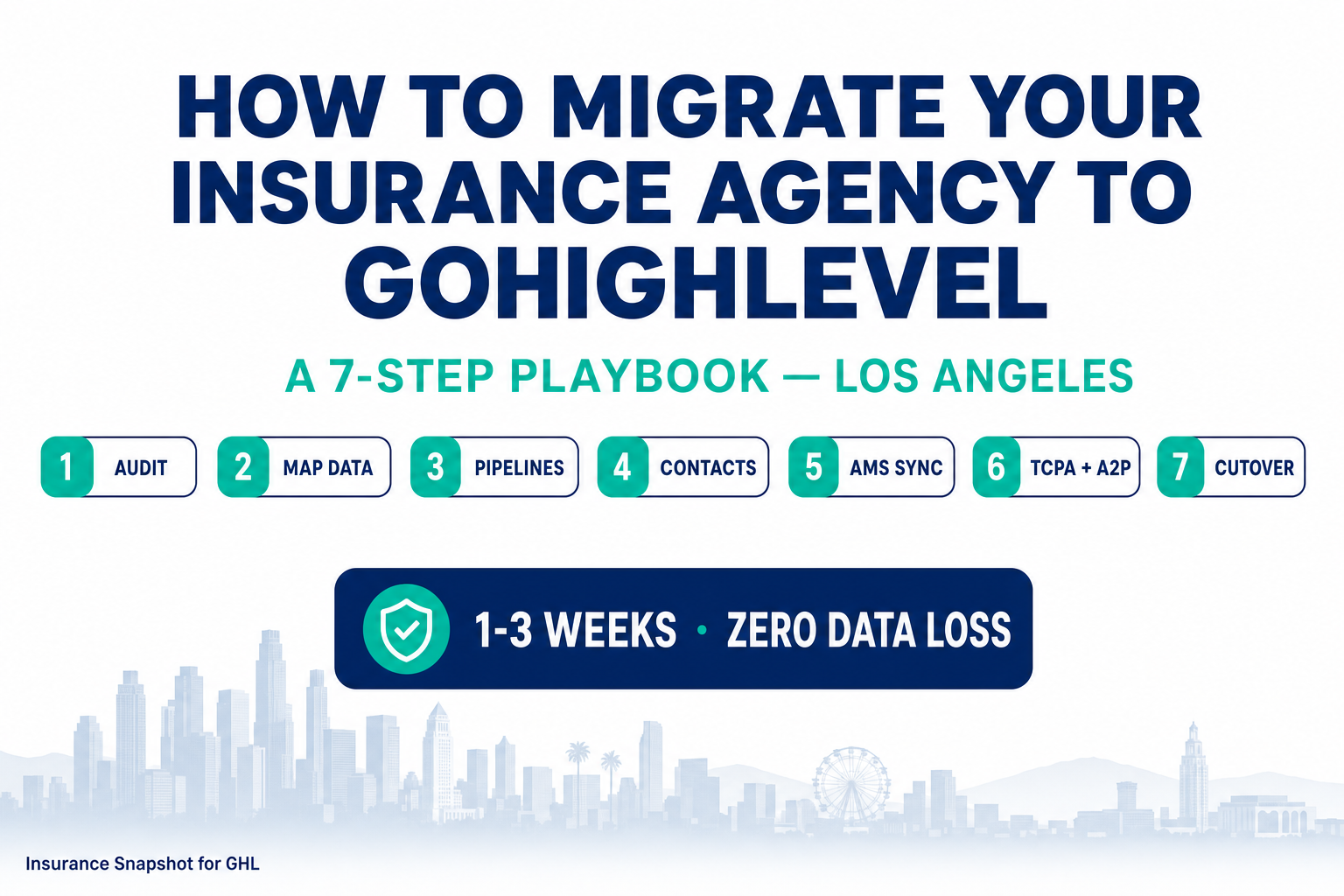
Table of contents
- What “migrating to GoHighLevel” actually means
- Why Los Angeles agencies are consolidating onto GoHighLevel
- Pre-flight: audit your data before you move anything
- The 7-step GoHighLevel migration playbook
- A realistic migration timeline
- Migration mistakes that lose data (or break TCPA)
- DIY vs done-for-you migration
- FAQ
What “migrating to GoHighLevel” actually means
For an insurance agency, “migrating to GoHighLevel” is not the same as spinning up a funnel. It means taking the book of business you run today — living in EZLynx, HawkSoft, Applied Epic, NowCerts, Vertafore, an old all-in-one CRM, or a stack of spreadsheets — and moving it into GoHighLevel so that GHL becomes the place your team actually works leads, follow-up, and renewals.
A real migration moves five things intact:
- Contacts — every household and business, deduped, with phone and email validated.
- Custom fields — the data that makes a record an insurance record: line of business, policy number, carrier, premium, effective date, renewal/X-date, producer.
- Tags and segments — how you slice the book: personal vs. commercial, mono-line vs. multi-line, active vs. lapsed, T65, AEP.
- Notes and history — the context on each account, so a producer opening a record in GHL sees the same story they saw in the old system.
- Pipelines — your actual sales and service stages, rebuilt so a quote moves from new lead to bound policy to cross-sell the way it does in real life.
Then it wires your AMS or rater to GoHighLevel so the two stay in sync instead of drifting apart the day after you switch. That last part is what separates a migration from a one-time export — your management system still holds the system-of-record policy data, and GHL holds the communication and pipeline layer, with data flowing between them.
Why Los Angeles agencies are consolidating onto GoHighLevel
Los Angeles is one of the most competitive insurance markets in the country: a huge, mostly-mobile population, thousands of independent and captive shops, and shoppers who collect several quotes before they bind. There are roughly 568,800 insurance sales agents working in the U.S. (U.S. Bureau of Labor Statistics) across about 39,000 independent agencies (Big “I” 2024 Agency Universe Study) — and California has more of both than any other state. A record 57% of auto customers shopped their policy in the past year, pulling roughly 3.5 quotes each (J.D. Power 2025 U.S. Insurance Shopping Study). Whoever answers first, and follows up every time, controls that conversation.
The problem is that most agencies can’t move that fast because their operation is spread across too many disconnected tools — and the sprawl is only getting worse, with the marketing-technology landscape now topping 14,000 products (ChiefMartec, 2024). The rater is one place, the AMS another, the email platform a third, texts come from a personal phone, and the “CRM” is a spreadsheet. Every one of those seams is a place a lead goes cold and a producer loses time re-keying data. It shows up in the numbers: sales reps spend only about 28% of their week actually selling, with the other ~72% lost to admin, data entry, and internal busywork (Salesforce, State of Sales).
Where a producer’s week actually goes
Share of a sales rep’s time, by activity. Source: Salesforce, State of Sales. Non-selling categories are illustrative of the ~72% spent outside active selling.
Consolidating onto GoHighLevel collapses those seams. Quote intake, pipelines, calendars, email, TCPA-safe SMS, and the AI-caller/chat follow-up all run in one place, and — once your AMS is wired in — the policy data your producers need is right there on the contact record. That’s the real reason to migrate: not novelty, but getting the ~72% back so producers can respond in minutes instead of days. And speed is the whole game — contacting a web lead within 5 minutes makes you 21× more likely to qualify it than waiting just 30 minutes (MIT / InsideSales Lead Response Management Study), yet the average firm takes 42 hours and 23% never respond at all (Harvard Business Review). Our speed-to-lead playbook breaks down why the first five minutes decide the bind.
Pre-flight: audit your data before you move anything
The single biggest determinant of a clean migration is the quality of the data you start with. Garbage in, garbage in GoHighLevel — except now it’s harder to spot because everything looks new. Before you export a single record, do a pre-flight audit:
- Dedupe. Households and businesses accumulate duplicate records over years. Merge them before migrating so you don’t carry the mess across and then have to untangle it inside GHL.
- Validate contact fields. Bad phone numbers and dead emails aren’t just useless — texting invalid or reassigned numbers is a TCPA and A2P deliverability risk. Clean them now.
- Standardize your custom fields. Decide the exact field names and formats you’ll use in GHL for line of business, policy number, carrier, premium, effective date, and renewal/X-date. Inconsistent source data (
Autovs.autovs.AUTO) becomes inconsistent segments later. - Decide what you’re not bringing. Genuinely dead records, one-off list buys with no consent, and ancient junk don’t need a new home. A migration is a good time to leave them behind.
The 7-step GoHighLevel migration playbook
Here’s the sequence we use to move an insurance book into GoHighLevel without losing data or breaking compliance. The order is deliberate — each step sets up the next.
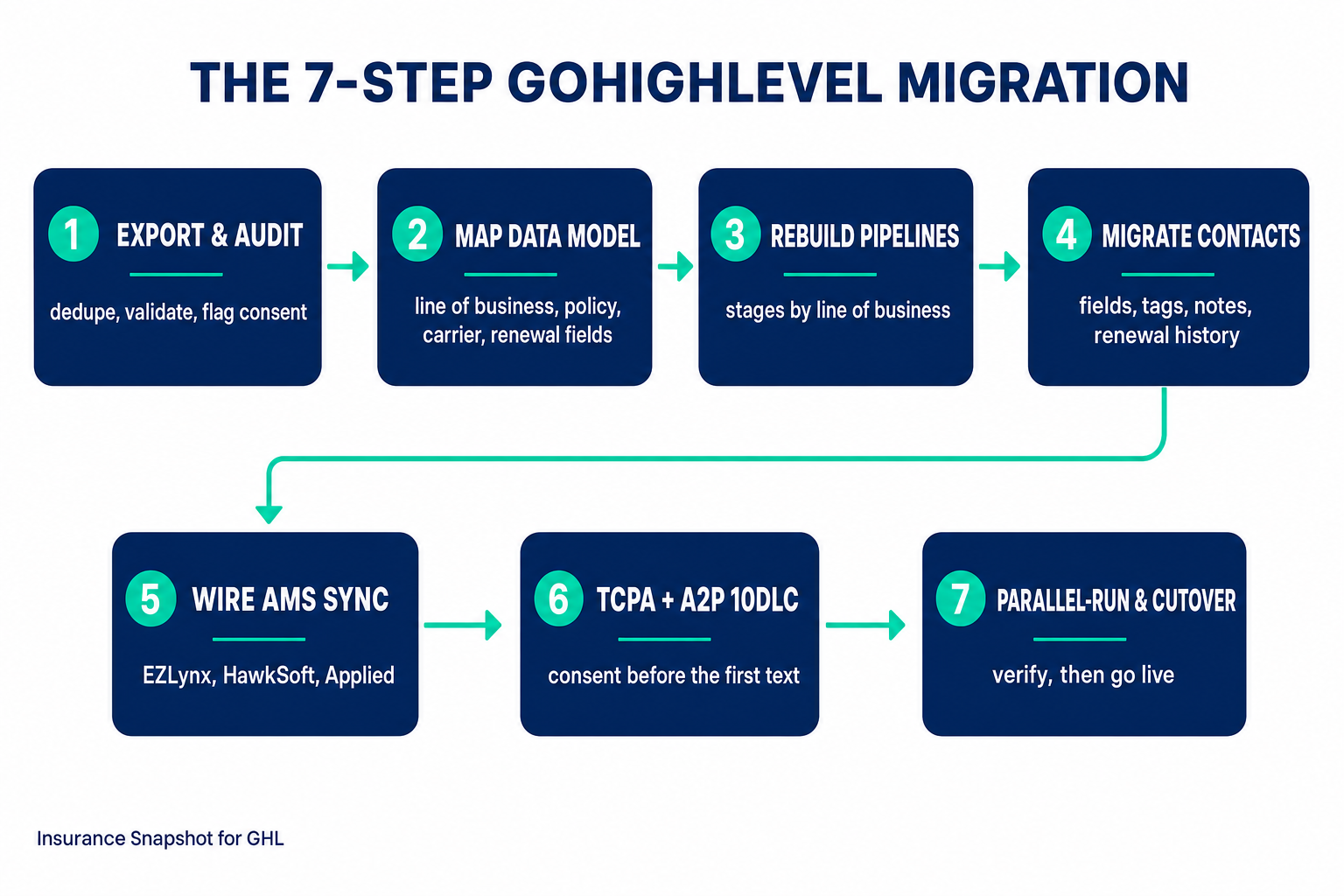
Step 1 — Export and audit the book
Pull a full export from your current system — CSV from the AMS or rater, plus any spreadsheets. Run the pre-flight audit above: dedupe, validate, standardize, and flag consent. This is where a migration is won or lost, so don’t rush it. The output you want is one clean, deduped master file (or a small set of them) with consistent columns.
Step 2 — Map your insurance data model in GoHighLevel
Before importing, build the shape of the data in GHL. Create custom fields for line of business, policy number, carrier, premium, effective date, renewal/X-date, and producer. Create the tags you standardized in the audit. This step is why insurance migrations fail when a generalist does them — GoHighLevel doesn’t ship with an insurance data model, so if you don’t design one deliberately, your policy data lands in the “notes” field as unstructured text and becomes unusable for automation.
Step 3 — Rebuild your pipelines by line of business
Recreate how a deal actually moves. For personal lines that’s usually: New Quote Request → Quoting → Quote Sent → Follow-Up → Bound → Cross-Sell. For commercial it’s longer. Build the pipelines and stages first so that when contacts import, they land in the right stage instead of a flat, stageless list. Our CRM & workflow automations feature shows the insurance pipeline structure the Snapshot ships with if you want a proven starting point.
Step 4 — Migrate contacts, fields, tags, notes, and renewal history
Now import the clean data into the model you built. Map every source column to the right GHL custom field. Bring the notes and renewal history across so producers see full context. Import in controlled batches, verify a sample after each batch, and confirm counts match your source before moving on. The verification pass is not optional — “it looked like it worked” is how agencies discover three weeks later that half their renewal dates are blank.
Step 5 — Wire your AMS or rater to GoHighLevel
A one-time import drifts out of date the moment a policy changes in your AMS. To keep GHL current, connect your management system with a two-way sync so contacts, policies, renewal dates, and pipeline stages stay consistent across EZLynx, HawkSoft, Applied Epic, NowCerts, or Vertafore and your GoHighLevel sub-account. Most systems expose an API, a webhook, or at least a scheduled export — enough to build a connector on. This is the step that ends double data entry for good, and it’s the core of what our custom GHL development service builds.
Step 6 — Re-establish TCPA consent and A2P 10DLC
Do not send a single text until this is done. Register your A2P 10DLC brand and campaign in GoHighLevel, and make sure every contact you’ll text has a real consent record — with STOP/HELP handling in place. Consent tied to your old platform does not automatically make the leap, and California agencies operate under both federal TCPA rules and strict state privacy expectations. Build the opt-in language and the STOP keyword flows before your first send. Our TCPA-safe SMS approach is built around exactly this.
Step 7 — Parallel-run, then cut over
Don’t flip a switch and pray. Run GoHighLevel alongside your old system for a short window: route new leads into GHL, verify automations fire, check that the AMS sync is flowing, and let producers work real deals in the new pipelines. Once the team trusts it and the data reconciles, cut over fully and retire the old workflow. Parallel-running for one to two weeks is cheap insurance against the one broken automation you didn’t catch in testing.
A realistic migration timeline
How long a migration takes depends mostly on your book size and data quality, plus whether you’re also building an AMS sync. Here are the real ranges we scope to:
Typical GoHighLevel project timelines (weeks)
Upper end of typical delivery windows. Source: Insurance Snapshot for GHL GHL development project scoping. A clean book migrates in 1–3 weeks; a connector adds 2–4.
A full book migration typically runs 1–3 weeks depending on data quality — a clean, well-structured export moves fast; a messy one full of duplicates and free-text policy data takes longer because the audit does. Wiring an AMS or rater connector adds roughly 2–4 weeks on top. If you’re also standing up a policyholder portal or a commission dashboard, that’s a separate, longer build. The takeaway for planning: budget a few weeks, not a few days, and don’t schedule your cutover for the first week of AEP or renewal season.
Migration mistakes that lose data (or break TCPA)
The failures we see most often are all preventable:
- Skipping the audit. Migrating dirty data just relocates the problem. Dedupe and validate first.
- No insurance data model. Importing policy data into unstructured notes instead of custom fields makes it invisible to automation. Build the fields first (Step 2).
- Losing renewal dates and history. These are the most valuable fields in an insurance book — they drive the entire renewal cadence. Verify them explicitly after import.
- One-time import, no sync. Without a two-way AMS connection, GHL drifts out of date and producers go back to re-keying. Wire the sync (Step 5).
- Texting before A2P and consent. The fastest way to turn a migration into a compliance incident. Consent and A2P 10DLC come before the first send (Step 6).
- Big-bang cutover. Flipping everything at once with no parallel-run means any missed automation fails silently on live leads. Parallel-run first (Step 7).
Most of these come from treating a migration as a quick export/import instead of a data-integration project. It’s the difference between “the contacts are in GHL” and “the agency actually runs on GHL.”
DIY vs done-for-you migration
You can migrate a small, clean book yourself, especially if it’s a few hundred contacts in a tidy spreadsheet. Where it gets risky is a real book — thousands of households, years of history, a live AMS, and TCPA exposure — because a mistake there isn’t a broken funnel, it’s lost renewal data or a consent problem. And CRM projects have a well-earned reputation for falling short: industry analysts have long estimated that a large share of CRM implementations fail to meet their objectives, almost always because of data hygiene and process, not the software (CIO). A managed migration exists to remove exactly those failure points.
Migrating your book yourself vs. a done-for-you migration
| Plan | Done-for-you migration recommended | DIY migration |
|---|---|---|
| Price | Scoped by book size | Your team's time |
| Feature 1 | Full audit, dedupe, and validation before import | Fine for a few hundred clean records |
| Feature 2 | Insurance data model + pipelines built for your lines | Easy to lose custom fields, tags, and renewal dates |
| Feature 3 | Two-way AMS/rater sync so data never drifts | No AMS sync — drifts out of date immediately |
| Feature 4 | A2P 10DLC + TCPA consent set up correctly | A2P/TCPA setup is on you to get right |
| Feature 5 | Parallel-run and verified cutover — nothing lost | Big-bang cutover risk with no safety net |
| Get a migration quote |
Done-for-you migration is one of our core GHL development services precisely because insurance books are high-stakes to move. We handle the audit, the data model, the pipelines, the AMS connector, the A2P and consent setup, and the parallel-run — so you land in GoHighLevel with your whole book intact and your producers able to respond in minutes. Fixed-price quotes for connectors and migrations start around $3K and are scoped to your book size, with an hourly retainer available if you prefer flexibility.
Once your book is in and syncing, the payoff compounds: drop the Insurance Snapshot automations on top and every lead gets instant follow-up, every renewal runs on a cadence, and every mono-line household enters a cross-sell sequence — the database-reactivation and retention engines that only work once your data actually lives in one place. If running GoHighLevel day-to-day is the part you’d rather not own, a dedicated GoHighLevel VA can operate it for you.
FAQ
How long does it take to migrate an insurance agency to GoHighLevel?
A full book migration typically takes 1–3 weeks depending on your book size and data quality. A clean, well-structured export moves quickly; a messy one full of duplicates and free-text policy data takes longer because the audit and cleanup do. Adding a two-way AMS or rater connector adds roughly 2–4 weeks on top. Plan for a few weeks — and don't schedule your cutover during AEP or peak renewal season.
Will I lose data — like renewal dates or notes — when I move to GoHighLevel?
Not if it's done properly. A clean migration maps every source field to a GoHighLevel custom field, brings tags, notes, and renewal history across, imports in verified batches, and reconciles counts against the source before cutover. Data loss usually comes from skipping the audit, failing to build an insurance data model first (so policy data lands in unstructured notes), or not verifying renewal dates after import. Each of those is preventable.
Can GoHighLevel connect to my AMS or rater like EZLynx, HawkSoft, or Applied Epic?
Yes. Most management systems and raters — EZLynx, HawkSoft, Applied Epic, NowCerts, Vertafore (AMS360, Sagitta, QQCatalyst) — expose an API, a webhook, or a scheduled export that a custom connector can sync to GoHighLevel. That two-way sync keeps contacts, policies, renewal dates, and pipeline stages consistent across both systems so your team stops re-keying data. Building that connector is one of our core GHL development services.
Do I need to redo TCPA consent and A2P 10DLC after migrating?
Yes — treat it as a required step, not an afterthought. You'll register your A2P 10DLC brand and campaign in GoHighLevel, and you need a real consent record for every contact you intend to text, with STOP/HELP handling in place. Consent tied to your old platform does not automatically carry over cleanly, and a migration (new platform, new sending numbers) is exactly the moment to get it right rather than assume.
Is migrating to GoHighLevel the same as buying the Insurance Snapshot?
No. Migrating your book is a data and integration project — moving contacts, fields, history, and pipelines into GoHighLevel and wiring your AMS to sync. The $997 Insurance Snapshot is the prebuilt automation system that installs on top. They pair perfectly — migrate the book, then drop the automations on it — but they're scoped and priced separately.
Should a Los Angeles insurance agency migrate to GoHighLevel itself or hire it out?
A small, clean book of a few hundred contacts can be moved in-house. A real book — thousands of households, years of history, a live AMS, and TCPA exposure — is worth handing to someone who does it regularly, because the failure mode isn't a broken funnel, it's lost renewal data or a consent problem. Done-for-you migration handles the audit, data model, pipelines, AMS connector, A2P/consent setup, and a verified parallel-run cutover.
About the author
Andre Bellamy is a GHL Automation Lead for the Insurance Practice at Insurance Snapshot for GHL. He spends his days inside agency accounts mapping how a lead moves from first quote to bound policy to cross-sell, then turning that into GoHighLevel workflows, pipelines, and TCPA-safe SMS that run without a producer babysitting them. He writes about the operational mechanics of insurance automation — data models, pipeline stages, and the migration decisions that separate “the contacts are in GHL” from “the agency runs on GHL.” Editorial byline only — Andre is not a licensed agent and does not quote, bind, or sell insurance.
Thinking about moving your agency onto GoHighLevel? See our GHL development & migration service, book a quick call, or talk to a real person.